
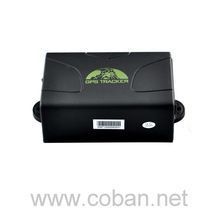


The Coban GPS104 is a versatile GPS tracker that combines GSM/GPRS wireless communication with GPS satellite positioning technology. With its wide range of features and functions, this tracker offers multiple ways to track and monitor your vehicles or assets. Whether you're using the monitor software on your PC, tracking through your PDA cell phone, or using Google Earth, you can easily access real-time tracking information and stay connected to your assets at all times.
Some of the outstanding features of the Coban GPS104 include the ability to add and delete authorization, single locating, continuous auto tracking, and tracking with limited or unlimited times based on time intervals. It also offers smart tracking based on time and distance intervals, automatic update of vehicle positions during turns, and GPS drift suppression for accurate location information. Additionally, you can benefit from location-based services, check the vehicle state, set terminal time, and even monitor voice surveillance.
Other notable features include data logging, data load, forwarding third-party messages, charge inquiries, oil and power system control, various alarm types (such as over speed, accident, shock sensor, SOS, low battery, and power off), GPS blind spot alerts, and the ability to configure parameters via USB. The Coban GPS104 also supports both TCP and UDP communication protocols, allowing you to switch between SMS and GPRS modes as needed. With its GPRS tracking and monitoring platform, you can easily manage and track your assets with minimal GPRS traffic.
Set Up GPS104
To set the tracker send the following commands by SMS messages, the sample setup the device password is qokoU2, this password is the default
- Factory reset
beginqokoU2 - Set the time zone UTC-0
time zoneqokoU2 0 - Set the operator APN
apnqokoU2 {{apn}} - Set the username and password of APN operator
upqokoU2 {{apnu}} {{apnp}} - Set the GPRS Server
adminipqokoU2 54.85.159.138 8888 - Set update interval
fix060s060s***nqokoU2 - Switch to GPRS mode to UDP or TCP
kQRWumW3wP,1,1
or
kQRWumW3wP
To check settings checkqokoU2
To enable the status of the fuel sensor or improve the transmission of the status of the digital sensors protocolqokoU2 18


